REVOKEMAIL
Sent the wrong email?
You have 24 hours
to take it back.
Your email isn’t final anymore.
Send from Gmail or Outlook as usual. Your recipient gets a secure link to read it. Change your mind within 24 hours, recall access, and the link stops working.
Free to try. Recipients don’t install anything.
Gmail · Outlook · More coming
- Opened before recall
- No
- Files downloaded
- No
- Access recalled
- 10:44:03
TRUSTED BY TEAMS AT


WHY NOT UNDO SEND?
Undo Send and Outlook recall only go so far.
- Gmail Undo SendA few secondsUp to 30 seconds, and only before the email leaves.
- Outlook recallInside your organisationUsually works only for people in your own company, not for clients or partners.
- Recall2424 hours, to anyoneRecall access within 24 hours, including when the email went outside your company.
HOW IT WORKS
- 1TURN ON RECALL24Add Recall24 to Gmail or Outlook and choose when it should be used. 24-hour email recall
- 2SEND EMAIL NORMALLYWrite and hit Send like always, attachments included. It sits in your Sent folder as usual.
- 3CHANGE YOUR MIND?You have 24 hours. After that the email is final and stays readable, like any other email.
- 4RECALL ITClick ↩ Recall. Done.
IN GMAIL AND OUTLOOK
Recall24 right next to Send. On autopilot if you want.
No new app and no new inbox. Write in Gmail or Outlook as usual and send with Recall24.
- 1Install for Gmail or OutlookAbout a minute. Recipients install nothing.
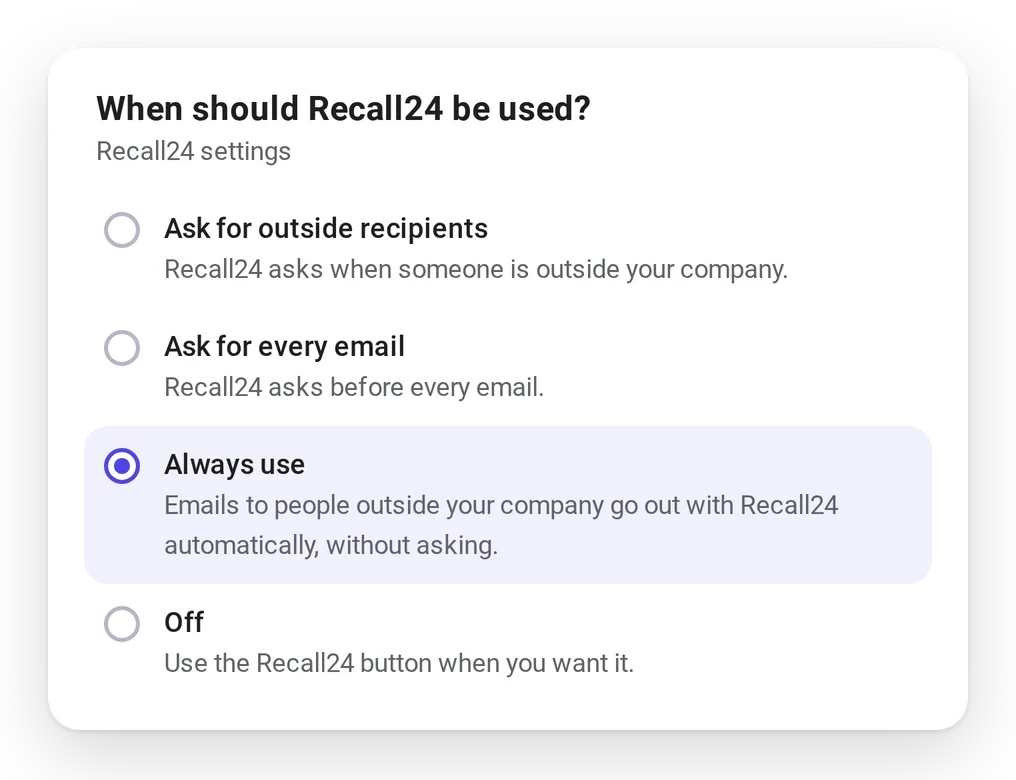
- 2Choose when Recall24 is usedAsk for outside recipients, ask every time, or off.
- 3BEST FOR TEAMSChoose Always useNobody has to remember to click. Every email to people outside your company is covered.

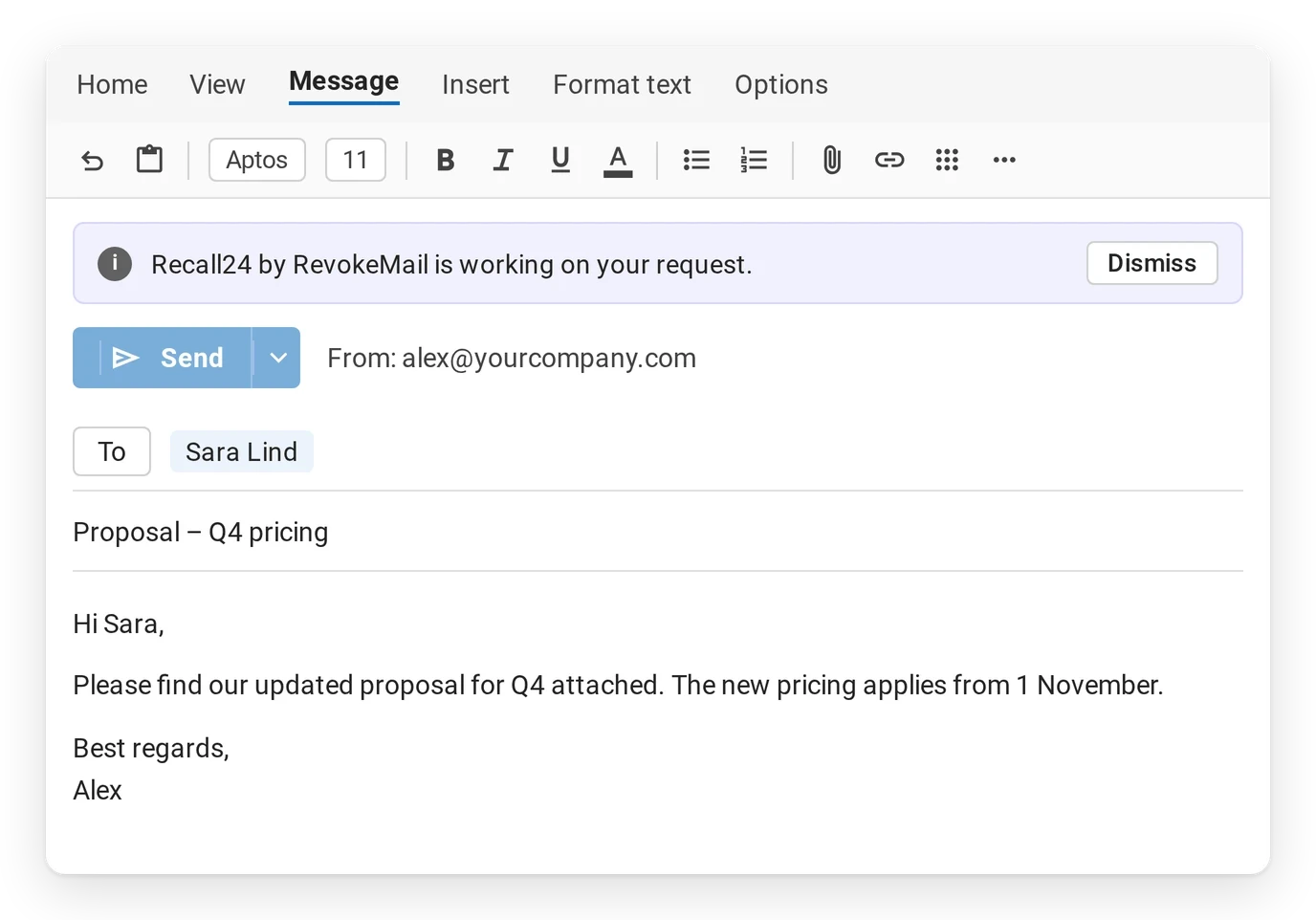
IN OUTLOOK
With Always use, just click Send.Emails to people outside your company go out with Recall24 automatically. Outlook shows a short notice while Recall24 takes over.Shown in Gmail and Outlook on the web. Recall24 also works in Outlook for Windows (new and classic) and Mac. Names and data are examples.
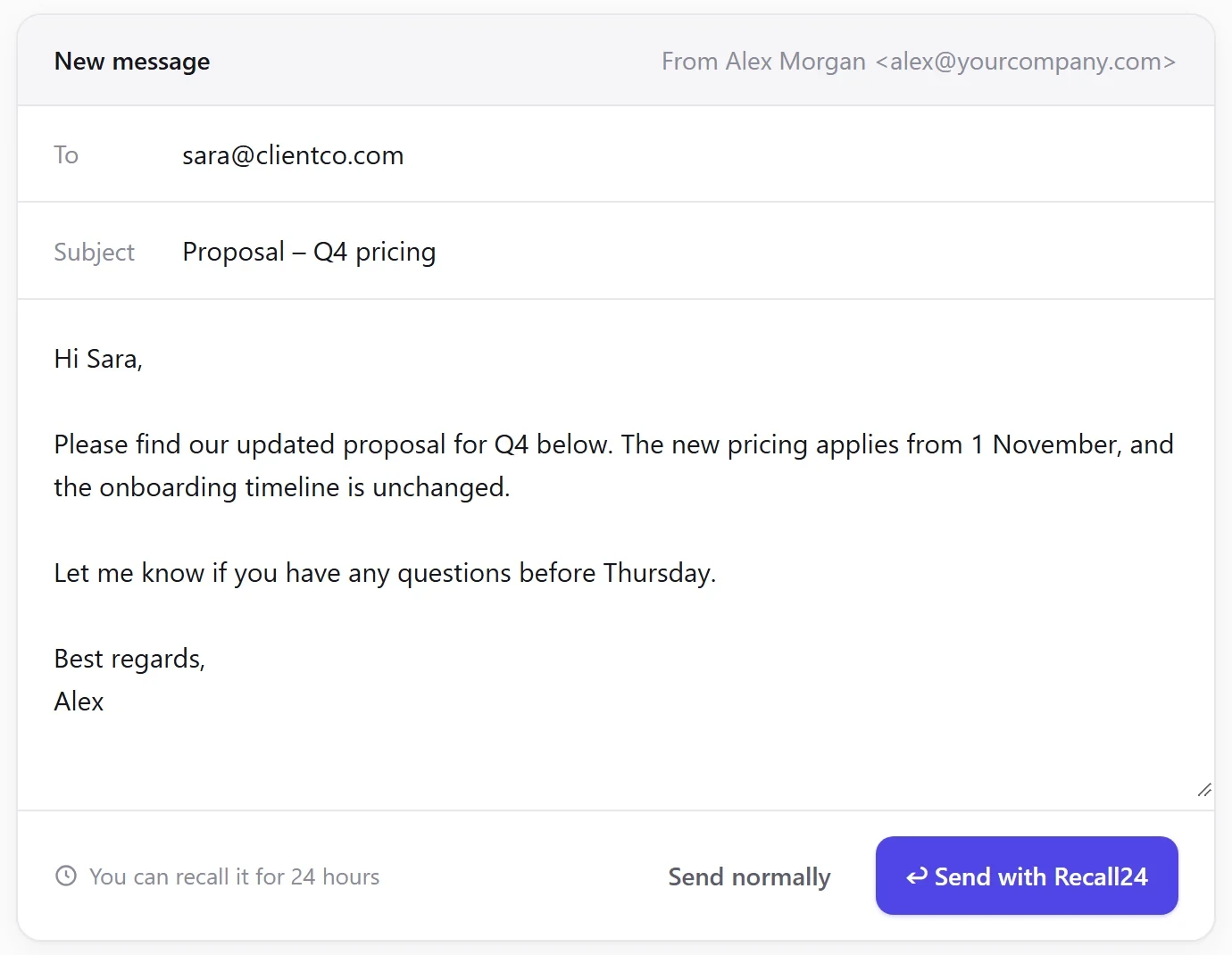

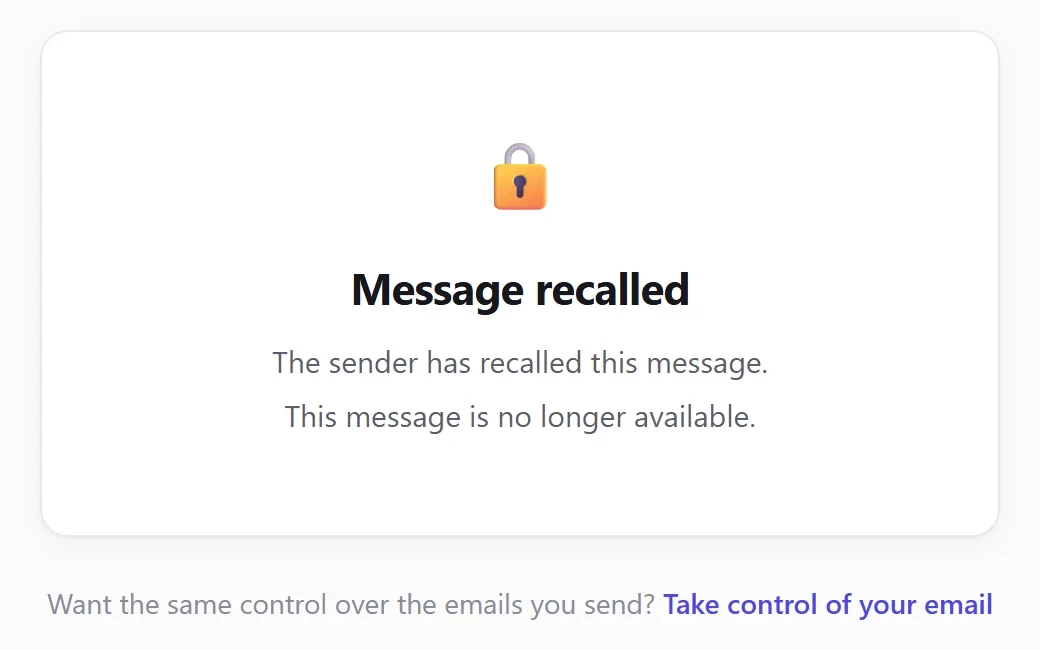
Screens from Recall24. Names and data are examples.
FOR INDIVIDUALS
For the emails you wish you could take back.
- WRONG PERSON
I meant to send that to Sarah.
- WRONG ATTACHMENT
Why did I send the old version?
- WRONG NUMBER
€12,000… not €120,000.
- EMOTIONAL EMAIL
I probably shouldn’t have sent that.
- SENT TOO SOON
I hit Send before I finished.
FOR PROFESSIONALS
For the emails that matter.
- CLIENT EMAILS
The update that went to the wrong client.
- PROPOSALS AND QUOTES
The quote with last month’s price.
- ATTACHMENTS
The draft instead of the final file.
- FINANCIAL FIGURES
One zero too many.
- BUSINESS COMMUNICATION
Sent before it was signed off.
Incident report
What exactly happened? You’ll know.
Every recall comes with an incident report, included at no extra cost. When someone asks what happened, whether that’s your manager, your client or your IT team, you can show them instead of guessing.
Each report shows:
- when the email was sent, and to whom
- whether it was opened through Recall24 before the recall
- whether any attached files were downloaded
- the exact time access was recalled
- a timestamped timeline you can download and keep
Incident reports record what Recall24 observed. They are a factual record, not a legal assessment.

Where it helps
Made for people who email clients, patients and guests every day.
YOUR EMAIL STAYS YOUR EMAIL.
You keep using Gmail or Outlook. Your recipients don’t need to install anything. Recall24 simply gives you a way back if you change your mind.
Recipients don’t need a Recall24 account or extension to receive or access your message.
- Stored in the EU. Messages and attachments are stored in Stockholm, Sweden.
- Text deleted when you recall. Recalling deletes the message text from Recall24, and its files can no longer be opened or downloaded.
- No access to your inbox. Only what you send with Recall24 reaches Recall24.
- Honest limits. A recall can't remove what someone already read, downloaded or saved. The subject line stays visible in their inbox.
- Not another inbox.
- Not another email provider.
- Nothing for your recipients to install.
What people say
“I sent a proposal to the wrong client, same first name, different company. I recalled it within a minute and the link just stopped working. That alone made it worth installing.”
Jon, Iceland
“I attached last year’s price list instead of the new one. Being able to take it back and send the right file, without an awkward follow-up email, was a relief.”
Richard, UK
“It sits inside Gmail, so nothing about how I write emails changed. Setup took a couple of minutes, and the people I email don’t need to install anything.”
Mark, United States
“I don’t use it every day, but knowing I have a window to take an email back changes how I feel after hitting send on something important.”
Helle, Denmark
Recall24 is made by RevokeMail, a small company in Iceland. About us →
GET RECALL24
Free to try. Install in about 1 minute.
Try Recall24 free. Works with the email you already use.


 COMING SOON
Frequently Asked Questions
Everything you need to know about 24-hour email recall.
Because sometimes “Send” shouldn’t be final.
You already use email every day. Recall24 gives you a 24-hour safety net if you send something to the wrong person, attach the wrong file, send the wrong information — or simply change your mind.
Send normally. Recall when you need to.
Gmail and other email services can give you a few seconds to undo a send, while email recall features can depend on the email provider and specific requirements.
Recall24 gives you up to 24 hours to recall access to a message sent through Recall24.
That means you don’t have to notice your mistake immediately. You can realise it later — and still have a chance to recall access to the message.
That’s the point.
You don’t use Recall24 because you expect to make mistakes. You use it because you want a safety net for the emails that matter.
Most of the time, you send your email and move on. If something goes wrong, Recall24 is there.
No.
You keep using Gmail or Outlook as normal. Recall24 works on top of the email you already use.
There’s no new inbox and no new email provider to learn.
They don’t need to do anything differently.
Recipients don’t need a Recall24 account or extension to receive or access your message.
If you recall it, access to the Recall24-controlled message is revoked.
Yes.
Recall24 gives you up to 24 hours to recall access to a message sent through Recall24.
The 24-hour period is a recall window — not a message expiration time.
Recall24 deletes the message text, the files can no longer be opened or downloaded, and anyone who opens the link sees that the message was recalled.
The recall action is recorded in your Recall24 dashboard.
Recall24 cannot control copies, screenshots or information the recipient may have already saved outside Recall24.
After 24 hours, the recall window closes.
You can no longer use Recall24 to recall access to that message.
If you did not recall it during the 24-hour window, the message does not automatically disappear after 24 hours.
No.
The recipient does not need to install Recall24, create an account, or use a specific email provider to access the message.
Yes. Up to 10 files, 4 MB each and 20 MB in total. Program files such as .exe are blocked. Recipients open the files through the same secure link, and after a recall they can no longer open or download them.
No. The subject stays visible in the recipient's inbox, also after a recall. Keep sensitive details in the message text or the attachments.
Yes. In your Recall24 settings you choose one of four options, and you can change it at any time:
- Ask for outside recipients (the default): when you click Send, Recall24 asks "Send with Recall24?" if anyone is outside your company.
- Ask for every email: Recall24 asks before every email you send.
- Always use: emails to people outside your company are sent with Recall24 automatically, without asking.
- Off: Send works as usual, and you use the Recall24 button when you want it.
An Incident Report is a factual record of what happened with a recalled message.
Depending on the information available, it can include details such as:
- When the message was sent
- When recall was requested
- Access status
- When access was revoked
- Other relevant message and event timestamps
Incident Reports are designed to provide a clear record of the event. They are not a legal or compliance determination.
Click Install for Gmail and sign in with your Google account. Then click Add to Chrome to add the Recall24 extension from the Chrome Web Store. Come back to the Recall24 tab and it connects by itself. Open Gmail and you’ll see Send with Recall24 next to Send. It takes about a minute, on a computer with Chrome.
Recall24 is free to try during early access.
Try Recall24 free.
Free during early access. No credit card needed.
Your email isn’t final anymore.
Know someone who sends important email?
Send them Recall24.
Try Recall24 free. Invite someone you know to try it.